Automation templates
The template library is the fastest way to get a working automation. Each template is a complete flow: a trigger, the messages, and sensible settings. You pick one, change the words to match your brand, and publish.
Open the template library
Section titled “Open the template library”- Open Automations from the sidebar.
- Click Automation template library.
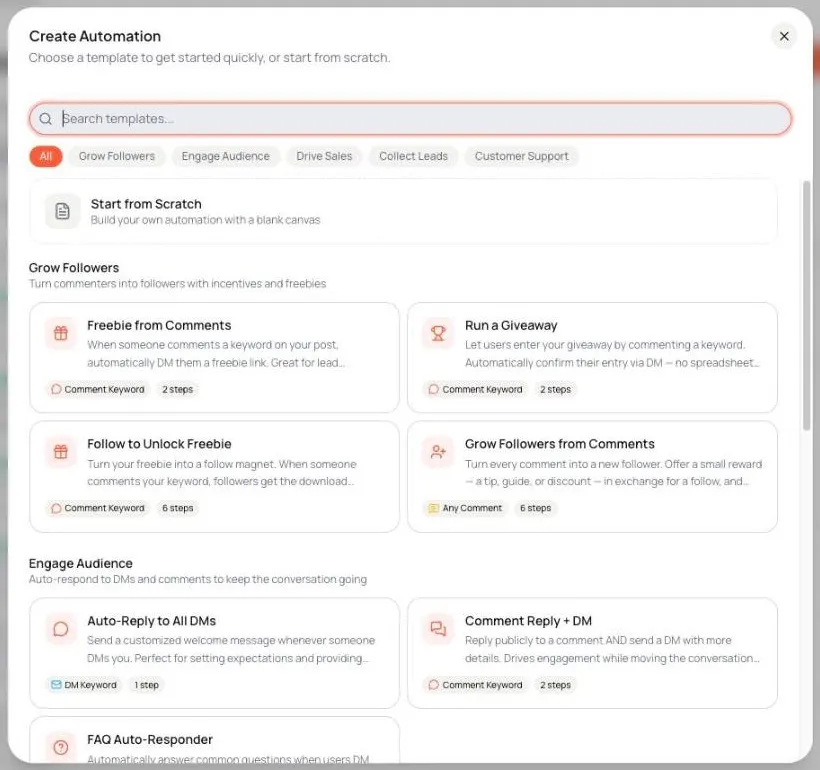
The Create Automation window opens. You can:
- Search by name or description in Search templates….
- Filter by category: All, Grow Followers, Engage Audience, Drive Sales, Collect Leads, Customer Support.
- Click Start from Scratch to build a blank automation instead.
Each template card shows its trigger type (Comment Keyword, DM Keyword or Any Comment) and how many steps it has.
Template categories
Section titled “Template categories”| Category | What it does |
|---|---|
| Grow Followers | Turns commenters into followers with incentives and freebies. |
| Engage Audience | Auto-responds to DMs and comments to keep the conversation going. |
| Drive Sales | Delivers product links, coupons and offers via DM. |
| Collect Leads | Asks for contact details in the DM so your team can follow up. |
| Customer Support | Answers common questions and hands off to your team when needed. |
Templates and your account’s region
Section titled “Templates and your account’s region”Comment-to-DM only works for accounts registered in Vietnam, Indonesia or Thailand that are a Verified Business Account (VBA), or that have Advanced Access and ran TikTok Messaging Ads in the last 7 days. If your account is not eligible, the library hides templates that send a DM from a comment, and says so at the top of the list: Comment-to-DM templates are hidden: they need an eligible TikTok account registered in Vietnam, Indonesia or Thailand. If you open one from an old link, Tuku shows This template isn’t available for your TikTok account’s region.
DM Keyword templates work for every account that can use DMs. Check your account on the connection checklist.
Use a template
Section titled “Use a template”- Click a template card.
- The editor opens with the template’s steps. The automation is not saved yet (Not saved yet badge). It is only created when you click Save Draft or Publish.
- Click each step on the canvas and replace the example text. Swap in your real prices, product names and links.
- Click the Trigger step and check the keywords. Add the words your audience really uses.
- For comment templates, check Post Scope. Pick Specific Posts if the offer only fits some posts.
- Click Publish.
The template itself never changes. Your copy is yours to edit.
Start from scratch
Section titled “Start from scratch”If no template fits:
- Click New automation from scratch on the Automations page, or
- Click Start from Scratch in the template library.
Type a name and click Create & Open Editor. You get an empty trigger, and you add every step yourself. See Your first automation.
Templates are not updated for you
Section titled “Templates are not updated for you”If Tuku improves a template later, automations you already made from it do not change. To use the new version, open the template again, compare, and copy the changes you want into your automation.
What to read next
Section titled “What to read next”| Topic | Page |
|---|---|
| Tune the trigger | Comment triggers |
| Tune the keywords | Keywords that actually fire |
| Build out the flow | DM flows |
| Reference for every step | Flow nodes |